Showing posts with label Timeline Profile. Show all posts

Wednesday, January 4, 2012

Facebook users who really dislike Timeline are getting scammed

According to a report from Inside Facebook, people who really hate Timeline and are looking for ways to get rid of it are becoming victims of scams on the social network.
By searching for “remove Timeline” or “disable Timeline” on Facebook, you’ll find a slew of groups and pages promising step by step instructions on how to disable the new Facebook feature that just recently went live for everyone. There’s only one problem, disabling Timeline is impossible, and users who follow these instructions are being scammed.
Some of the scams don’t appear to be harmful, simply dropping you on a landing page asking you to like a few pages and in return your Timeline will magically disappear. Mind you, it seems like an obvious scam to those who are tech savvy, but for people who really don’t understand how Facebook works and don’t like the new feature, they’ll apparently try anything:
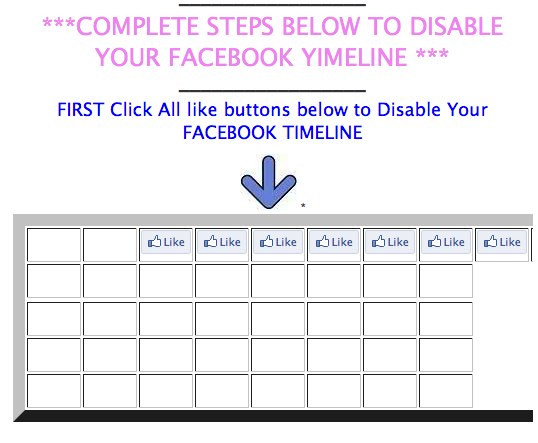
Disable Your F a c e b o o k Timeline 520x428 Facebook users who really dislike Timeline are getting scammed
While liking things won’t do any technical damage, some scams are asking people to download and install extensions for their browser, and who knows what type of harm that could cause. For example, 14,068 people have liked this page that automatically prompts you to download an extension as soon as you do so:
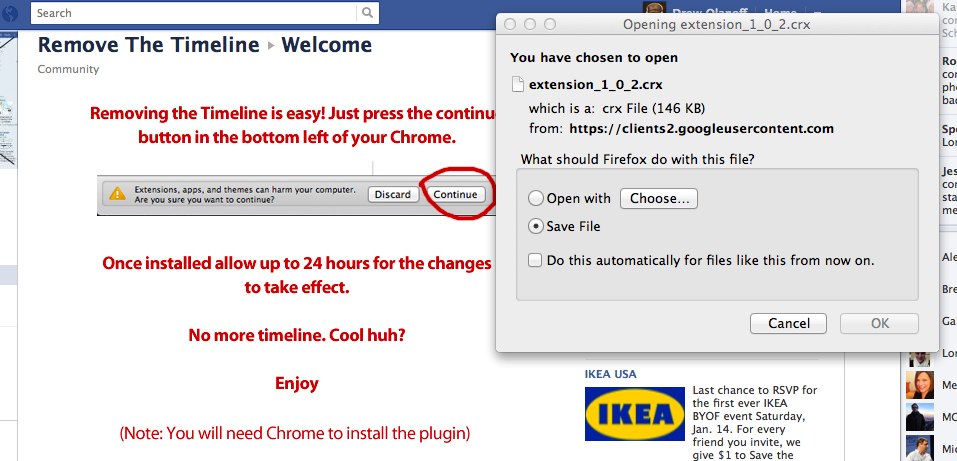
Opening extension 1 0 2.crx  520x250 Facebook users who really dislike Timeline are getting scammed
There’s no way to know how successful these scams have been or what they do to users exactly, but it’s best to keep an eye out for these types of things if one of your friends shares it with you. There’s no way to disable Timeline once you’ve said yes to trying it out, and it will be mandatory in the coming weeks. If you find one of these pages, you can simply click “Report page” in the bottom right hand side to help Facebook get rid of this junk.
If you really despise Facebook, you could always go back to using IE7, which is no longer supported by Facebook.
Source: The Next Web

Monday, October 3, 2011

Facebook Timeline Launch NOT Delayed


You may have read the stories about the recent lawsuit against Facebook in which Timelines.com claims the company infringes upon its “Timeline” trademark.
Here is a section from the court complaint, filed in the U.S. District Court of Chicago:
Facebook’s use of the term “Timeline,” and its redirection of Internet traffic from Timelines’ Facebook page to Facebook’s new “Timeline” offering, infringes on Timelines’ federally registered trademarks in that it causes confusion as to the source of the services offered to users of the Internet. Indeed, Facebook’s “Timeline” offering and its misdirection of users attempting to access Timelines’ offering is intended to prevent Internet users from accessing information about Timelines.com and to allow users to instead use Facebook’s “Timeline” offering.
There have been other reports today that Facebook is “delaying” its release of the Timeline feature, and that the root cause of that could be this particular lawsuit. See Mashable’s report:
The public launch of Timeline is now at least delayed until Tuesday, when representatives from Facebook and Timelines.com will meet again in front of another federal judge to debate whether an injunction should be issued against Facebook.
However, if you pay attention to the actual filing of the Temporary Restraining Order (TRO), you will see that Facebook contests that it has not changed any public release plans or dates for Timeline, as Mark Zuckberberg himself said at f8 that the company would release Timeline“in the coming weeks”, therefore the TRO was rejected by the judge and Facebook has delayed nothing.
You can read the full document here:

Source: The Next Web

Here is the way how to  Hack Facebook to get New Timeline Profile

Wednesday, September 28, 2011

Lets Hack Facebook to get New Timeline Profile (It Works)

Admins Profile
Instructions First, log into Facebook and go to Facebook for Developres Page 

Now click create an app by clicking the button in the top left corner.

Just create an app name and namespace. After that you will arrive at the app’s main setting screen. 

Click on the link labeled “Open Graph” on the left to open up the Open Graph Getting Started page. To get started with Open Graph, you’ve got to fill in an action your app can do and an object for your app to interact with. 

After you’ve created your action and object, click the Get Started button. This will drop down the first of three pages of settings but, since no one will see them, they shouldn’t matter. Quickly click through them to create your app. 

When you’re done, you should see a page. 

Now go to your home page and you will see an invite for the new facebook Timeline at the top of the screen. 

The new Timeline is a little bit buggy, and not everything Zuckerberg promised in Thursday’s keynote has been implemented yet. Its not yet public so your friends will not see the new profile when they visits your profile.

Source: Internet